
A paywall is a system that blocks some or all of a website's content until the visitor pays, subscribes or registers. Publishers, newsletters and online course creators use paywalls to earn money directly from readers instead of relying only on advertising.
This guide is for publishers and subscription businesses deciding how to gate their content. It explains the paywall meaning, how a paywall works, the six main types of paywall with examples, and how to choose the right one.
What Is a Paywall
A paywall is a barrier between a visitor and premium content that opens only when the visitor meets a condition, usually a paid subscription. The New York Times is the best-known example: since 2011 it has let visitors read a limited number of free articles before asking them to subscribe.
A paywall turns a website's audience into recurring revenue that doesn't depend on ad rates. It also tells the business who its readers are. Every subscriber or registered user is a known person with an email address, a reading history and a reason to come back, which advertising alone never provides.
Merriam-Webster defines a paywall as a system that stops internet users from reaching certain web content without a paid subscription. The paywall meaning has widened since that definition was written. A modern paywall can ask for an email address instead of a payment, sell a single article or event, invite a donation, or decide in real time whether to appear at all. It has become the point where a website asks each visitor for the next step, whatever that step is.
How a Paywall Works
When a visitor opens a page, the paywall checks who they are and what they're allowed to see. A signed-in subscriber gets the full article. An anonymous visitor might see the first few paragraphs, a count of free articles left this month, or a prompt to subscribe or register.
To decide, a paywall tracks a few things: whether the visitor is logged in, what they've paid for (their entitlements), how many articles they've read on a metered paywall, and on a dynamic paywall, signals like location, device and how they arrived. The most secure paywalls enforce access on the server, so protected text is never sent to a visitor who hasn't paid. A paywall that only hides content in the browser can be bypassed by anyone who views the page source.
The 6 Types of Paywalls
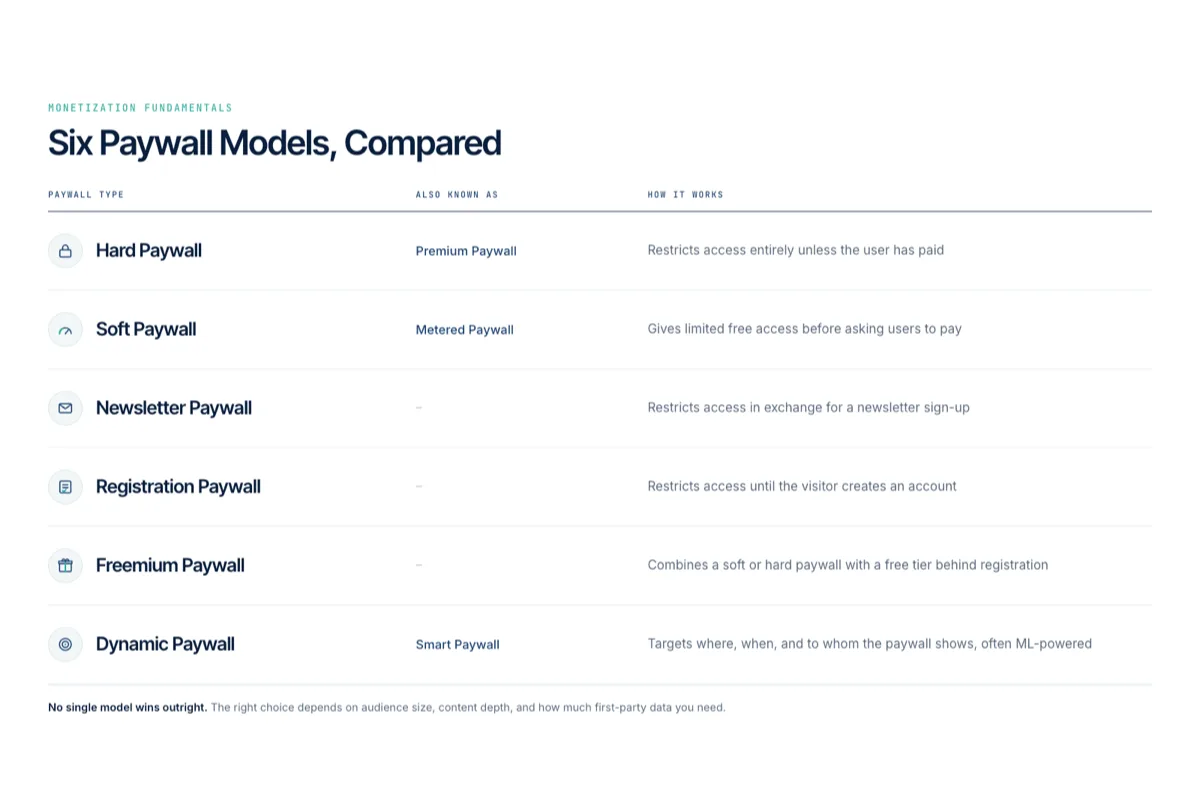
Most paywalls fall into one of six types. They differ in how much content is free and what the visitor has to give to read the rest.
1. Hard Paywall
A hard paywall, also called a premium paywall, blocks content entirely until the visitor pays. Visitors see a headline and perhaps a summary, then a prompt to subscribe. It suits specialist content readers can't find elsewhere, such as financial news or industry research; the Financial Times keeps most of its journalism behind a subscription. THN.com's All-Access Member area works the same way, gating premium content while the rest of the site stays open. See when to use a hard paywall.
2. Soft Paywall (Metered Paywall)
A soft paywall lets visitors read some content free before asking them to pay. The most common version is the metered paywall, which allows a set number of free articles each month, the model The New York Times and Medium use. It keeps search and social traffic flowing while still converting regular readers. Read more on what a soft paywall is and metered paywall best practices.
3. Freemium Paywall
A freemium paywall keeps most content free and puts selected premium articles, features or tools behind the wall. Readers see a mix of open and locked stories, which shows them exactly what a subscription adds. Here's how freemium works and where it breaks.
4. Registration Paywall
A registration paywall, or registration wall, asks for a free account instead of a payment. The visitor gives an email address and gets access, and the publisher gets a known reader it can convert to a paid plan later. See how publishers use registration walls to grow subscribers.
5. Newsletter Paywall
A newsletter paywall unlocks content when the visitor signs up for an email newsletter. Like a registration wall, it trades access for an email address, but the follow-up is the newsletter itself, which builds the reading habit that leads to a paid subscription.
6. Dynamic Paywall
A dynamic paywall decides for each visitor whether to show the wall, and which offer to show, based on data such as location, device, traffic source and reading behavior. A loyal reader might see a subscription offer sooner, while a first-time visitor from search reads freely. Some dynamic paywalls use machine learning to predict who is likely to subscribe. Learn how to use a dynamic paywall and why a dynamic paywall doubles as an audience analytics tool.
How to Choose a Paywall Type
Most publishers combine types: a registration wall for anonymous visitors, a meter for registered readers and a hard paywall on premium sections. Start with how unique your content is and how much of your traffic comes from search. The more replaceable the content, the softer the paywall should be. Then test it. Changing the meter limit or the offer and measuring conversions tells you more than any rule of thumb; here are A/B testing best practices for your paywall.
How Pelcro Handles Paywalls
Pelcro runs hard, soft, metered and dynamic paywalls from one platform, together with the subscriptions, billing and customer accounts behind them. Marketing teams can set up a metered paywall and choose which content or features to gate without writing code. Dynamic targeting shows different paywalls by location, device or user, and built-in A/B testing and analytics show which version converts best.
For developers, customizable React components cover paywalls, content gates and subscriber dashboards, so a custom paywall doesn't start from scratch. When L'actualité moved from a legacy paywall provider to Pelcro, the magazine saw a 13 percent increase in gross revenue. Explore Pelcro's paywall.
Build and Customize a Paywall With Pelcro AI Studio
You can now build and change a paywall by describing it. Pelcro AI Studio, an AI coding agent, takes a request in plain language, such as "move the wall to paragraph 3", writes the Pelcro code, commits it to a branch and gives you a preview link of your site with the change applied. Nothing reaches readers until you approve and merge it, and rolling back is one click.
The agent is trained on the Pelcro JS SDK and React Elements, so it uses the platform's entitlement checks instead of guessing, and every change is ordinary code in your repository that a developer can read and edit. You can customize where the wall sits, its headline, its price and its offers, then test them: for an A/B test the agent copies the live paywall rather than editing it, changes one variable at a time and reports conversion for each variant, so you keep the winner and revert the rest.
Frequently Asked Questions
What does paywall mean?
A paywall is a website feature that blocks some or all content until the visitor pays, subscribes or creates an account. The word joins "pay" and "wall": the wall stands between the reader and the content until they pay or sign up.
What is an example of a paywall?
The New York Times metered paywall is the best-known example: visitors read a limited number of free articles each month, then need a subscription. The Financial Times uses a stricter hard paywall, and many news sites ask for a free registration before anything else.
What is the difference between a hard paywall and a soft paywall?
A hard paywall blocks content completely until the visitor pays. A soft paywall, usually metered, lets visitors read some content free before asking them to subscribe. Hard paywalls earn more from each reader, while soft paywalls keep more traffic and convert it over time.
Is a paywall the same as a subscription?
No. The paywall is the gate, and the subscription is what opens it. Depending on how it's set up, a paywall can also open for a one-time purchase, a free registration or a newsletter signup.
Can I build a paywall with AI?
Yes. Pelcro AI Studio builds a paywall from a plain-language description, writes the code against the Pelcro SDK and commits it to a branch with a preview link. You review the change before it goes live, and you can keep asking it to adjust the wall's position, copy, price or offers.
Why do websites use paywalls?
Advertising rarely covers the full cost of original journalism and content, so websites use paywalls to earn recurring revenue directly from readers. A paywall also gives them first-party data on who their readers are, which helps them keep subscribers and sell better-targeted advertising.