Invoice Automation
Pelcro's invoice automation enables publishers and subscription businesses to generate recurring, usage-based, and one-off invoices automatically while maintaining full billing accuracy and compliance.
By submitting your email, you agree to opt in to marketing emails.
Already trusted by leading publishers worldwide








Pelcro AI Studio · AI coding agent
Fix checkout and payments from a prompt
Copy a prompt into Pelcro AI Studio. It writes the checkout change against the Pelcro SDK and shows it right away in the live preview.
Try these in Pelcro AI StudioWallet payments
“Add Apple Pay and Google Pay buttons to the checkout modal”
Cancellation save
“Save subscribers who try to cancel with a 20% discount”
Invoice generation
Generate all invoices automatically while maintaining accuracy and compliance
Automate recurring, usage-based, and one-time invoices. Simplify subscription billing, tax handling, and payment workflows.
Automated invoice generation
Automatically generate invoices for subscriptions, one-time purchases, and usage-based billing without manual work.
Custom invoice templates
Create branded invoice templates with customizable line items, taxes, and billing rules.
Automatic tax calculations
Apply regional tax rules automatically and maintain compliant billing across multiple currencies and jurisdictions.
Compliance built in
Keep an accounting paper trail on every invoice — including EN 16931-compliant e-invoicing for accounts that need it.
Invoice types & workflows
One billing engine for every kind of invoice
Invoicing sits alongside payment processing and accounts receivable, so billing and collections share one record.
Documents & records
Invoices your customers — and your auditors — can read
Branded invoice PDFs
Set header and footer memos, support contact details, statement descriptor, and where the Pay Now button sends customers.
Bulk print for print houses
Select open invoices — or all of them — and get one ZIP of individual PDFs in sequence, ready to hand to your print house.
Search and CSV export
Search by invoice number or customer email, filter by date range, and export the full list to CSV for accounting.
Get a free evaluation of your current invoicing
We'll map your billing models, tax rules, and invoice templates — and show you what running them on one platform looks like.
Who it's for
For finance and billing teams
Tax handling across jurisdictions
Apply regional tax rules automatically and keep billing compliant across multiple currencies and jurisdictions — including per-line custom tax rates on standalone invoices.
Credits, coupons, and balances
Prorations become credit notes, coupons and gifts show as discounts, and customer balance can be applied to an open or past-due invoice — partially or in full.
Controls that protect the paper trail
Void, mark uncollectible, or auto-uncollectible on a schedule you set — every action leaves an accounting trail instead of a deleted row.
What publishers say after moving to Pelcro
All customer stories“We chose Pelcro because they appeared to do everything we wanted to do, and they did it in a way we were completely happy with.”

“This software takes care of the important things — member management, billing, product/plan management, authentication — so we can focus on creating a unique and seamless experience for our members.”

“Pelcro's system has helped us improve the fluidity of our data flow between different systems.”

See it in action
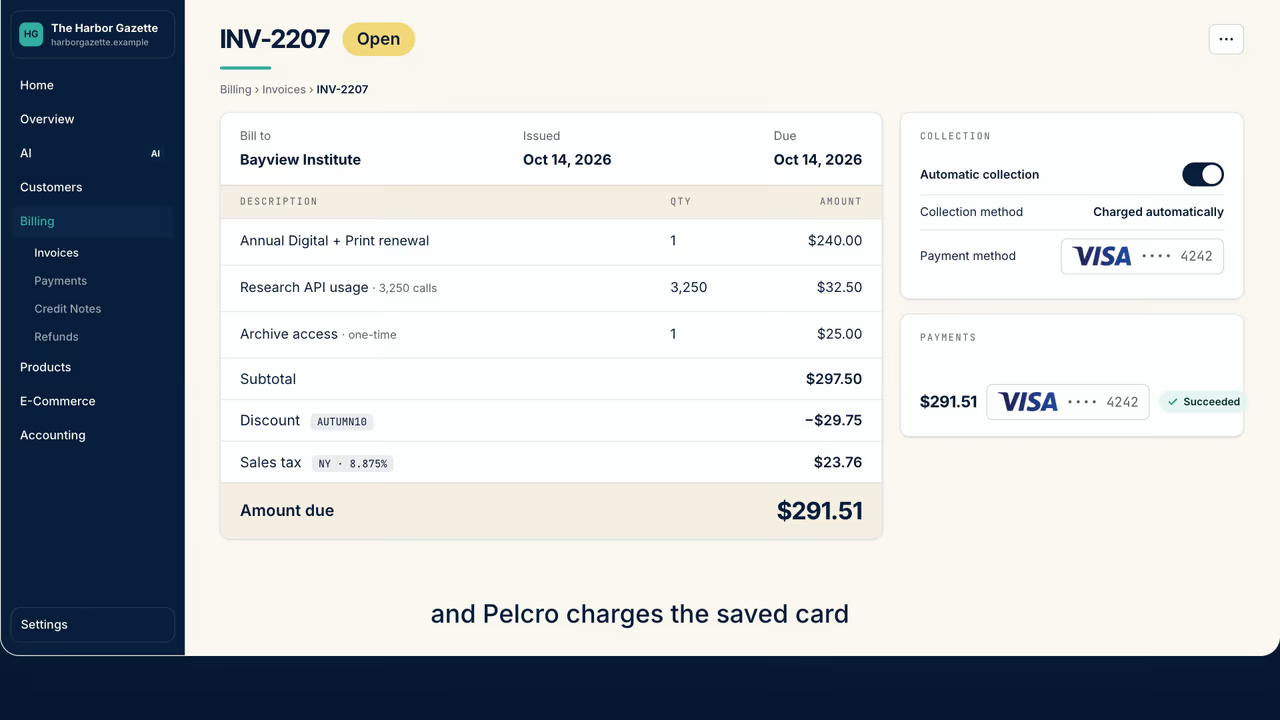
Every invoice, collected for you
Watch Pelcro create an invoice for every renewal, one-off purchase and usage charge, add tax for each region and any coupons, charge the saved card, and keep a PDF paper trail.
FAQ
Invoicing questions
- What should publishers look for in subscription invoicing software?
- Publishers should look for invoicing software that creates invoices automatically at every renewal, supports both card payments and offline invoices, and tracks each invoice from draft to paid. Pelcro does this for subscriptions and memberships, with taxes, credit notes and printable PDF invoices built in. Look for automatic invoices at every renewal, with the option to bill future-dated subscriptions at creation or on the start date. The software should support automatic card charges and manual invoices paid by ACH or cheque and marked paid, with clear statuses: Draft, Open, Past due, Paid, Uncollectible and Void. Institutional and library buyers need purchase order numbers and invoice notes. You also want PDF invoices with your own notes and contact details, bulk printing of open invoices, taxes and credit notes on the invoice, and rules for unpaid invoices, such as marking them uncollectible after a set number of days.
- Can subscribers pay an invoice by cheque or bank transfer?
- Yes. In Pelcro, a subscription can use manual collection. The invoice stays open until payment arrives by ACH credit transfer or cheque, and staff mark it paid.
Get started
Automate your invoicing with Pelcro
See how Pelcro generates recurring, usage-based, and one-off invoices automatically — with taxes, discounts, and compliance handled.
By submitting your email, you agree to opt in to marketing emails.