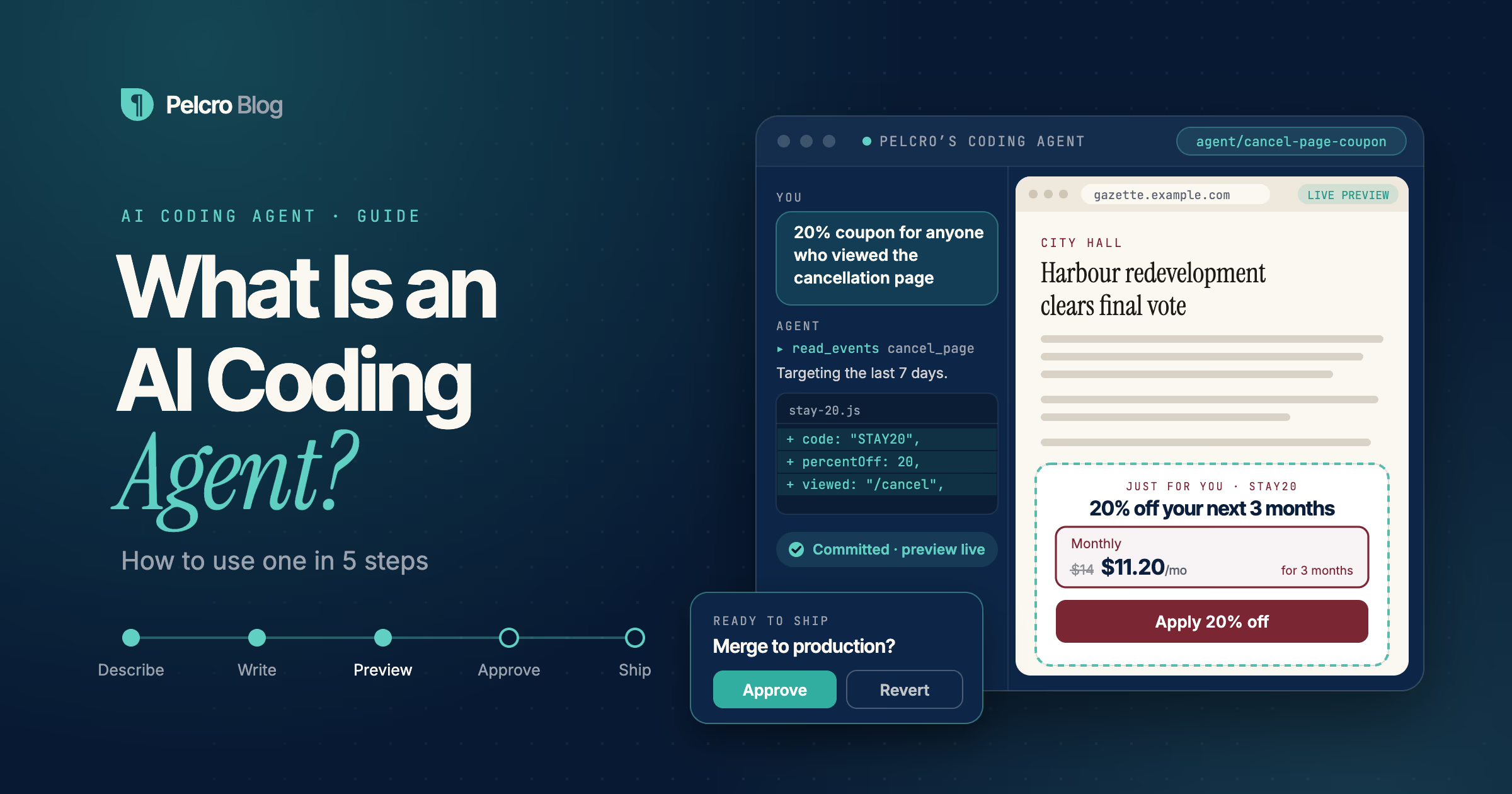
An AI coding agent is software that takes a plain-English request, writes the code to fulfill it, and hands the result back for review. To use one, you describe the change, let the agent write it, preview it, approve it, and ship it.
For publishers and subscription teams, that means a paywall or checkout change no longer has to wait in an engineering queue. This guide explains what an AI coding agent is, how it differs from a coding assistant, and how to use Pelcro's coding agent to ship a paywall change in five steps. You can also try it yourself in the interactive panel below.
What Is an AI Coding Agent
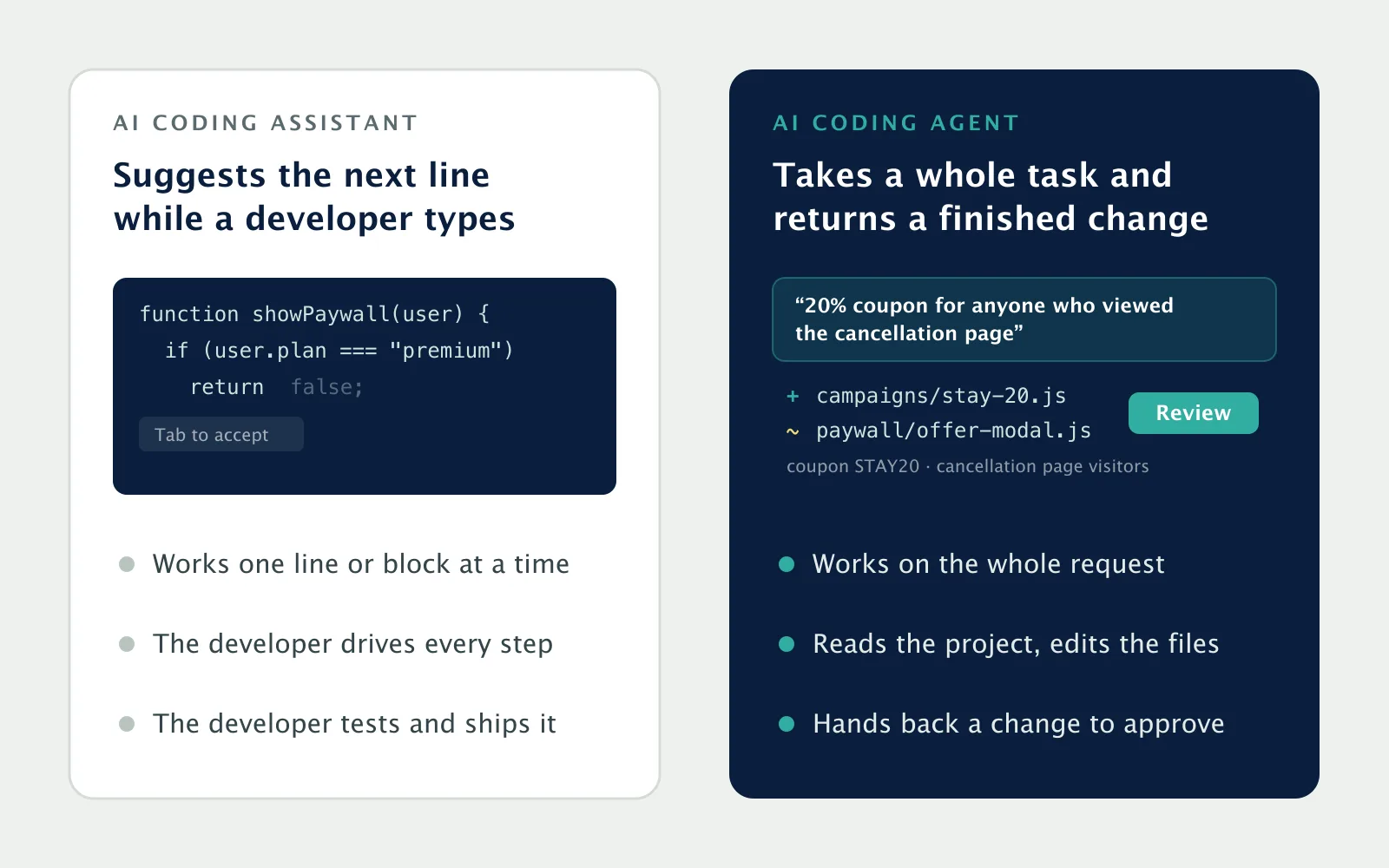
An AI coding agent is an AI system that works toward a goal in a codebase rather than suggesting one line at a time. You might ask it to "show a 20% coupon to subscribers who visited the cancellation page," and it creates the coupon, targets the offer, and returns a finished change.
That is the key difference from an AI coding assistant. An assistant autocompletes code while a developer types. An agent plans the work, reads the project, changes several files if needed, and reports back with a result you can review.
For a business, the value shows up on both sides of the ledger. Changes that bring in or keep revenue, like a coupon for subscribers who are thinking of cancelling, a faster checkout, or a price test, ship the day someone thinks of them instead of waiting for a sprint.
They also cost less to make. A request that used to need a ticket, a spec, and an engineer's time becomes a sentence from the person who wants the change.
General-purpose agents such as Claude Code, Cursor, and GitHub Copilot work across any codebase. That flexibility has a cost: on a specialized stack like subscription billing, they have to guess how your platform is meant to be used. A domain-specific agent is trained on one platform, so it writes code against the API that actually exists.
How to Use an AI Coding Agent in 5 Steps
Using an AI coding agent follows the same loop every time. Here is that loop, using a coupon for at-risk subscribers as the example.
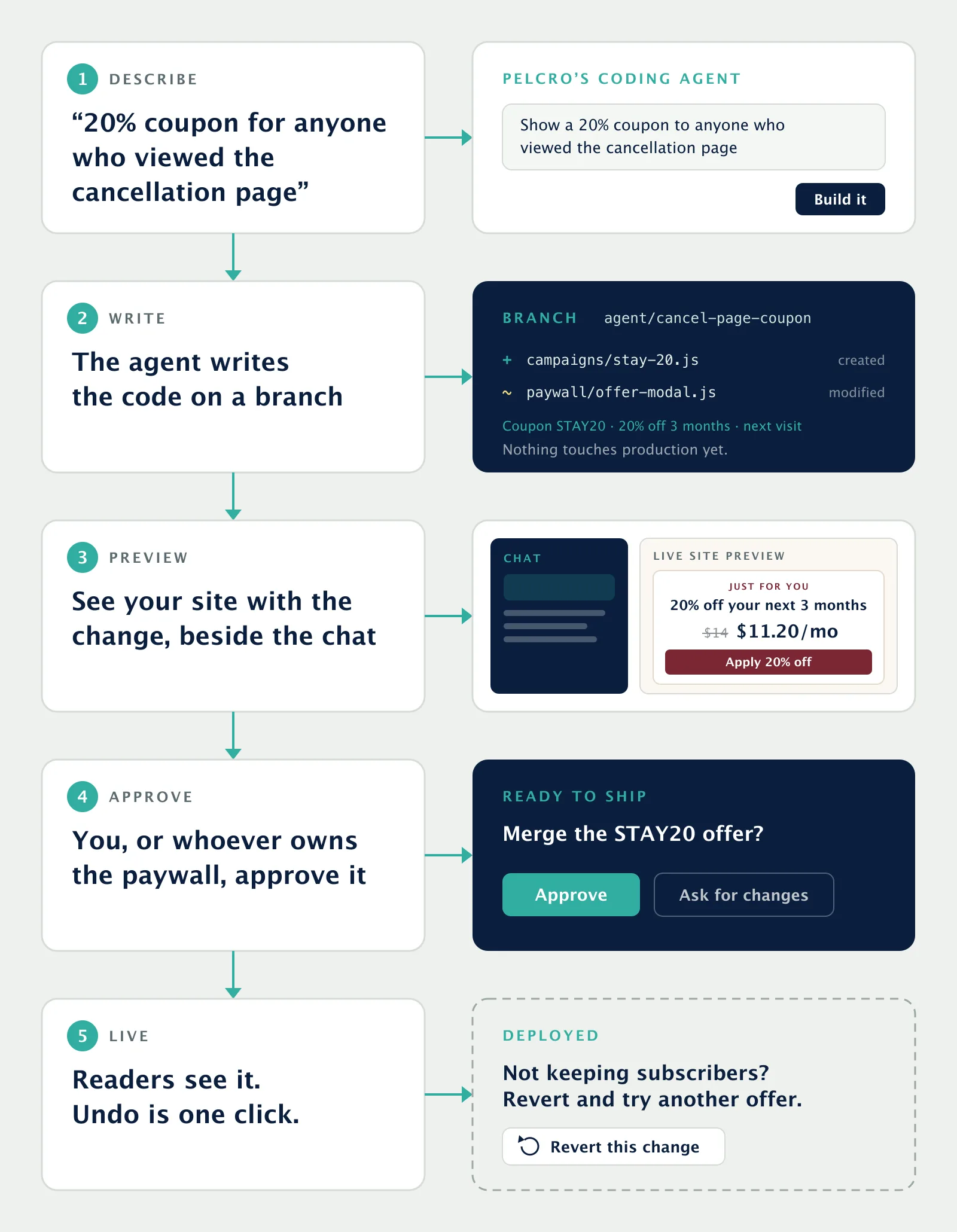
1. Describe the change in a sentence
Start with what you want, in plain English. "Show a 20% coupon to subscribers who visited the cancellation page," "Add Apple Pay and Google Pay to checkout," or "A/B test two price points" are all complete requests.
Be specific about the outcome, not the code. You do not need to know how cancellation-page visits are tracked. Finding that is the agent's job.
2. Let the agent write the code
The agent reads your plans and your site's events, creates the coupon, and shows the offer to those subscribers on their next visit. The work is committed to a separate branch, so nothing touches production while it builds.
3. Preview the change next to the chat
Before anything goes live, you see the result. In Pelcro's coding agent, a preview of your live site with the change applied appears on the side of the chat, so there is no separate URL to hunt for.
If it is not right, say so in the same chat. "Make it 25% off" or "only show it to monthly subscribers" is enough for another pass.
4. Approve it
When the preview looks right, you, or whoever owns the paywall, approve the change. This step is what makes it safe to hand paywall work to a marketing team, because the agent cannot quietly change what readers see.
5. Ship it, and roll back if you need to
Once approved, the change goes live and readers see it. The commit is the record of what changed.
If something underperforms, rolling back is one click. Because every change is a commit, reverting brings the previous paywall back exactly as it was, including its pricing and copy. If an offer isn't keeping enough subscribers, revert it and try a different one.
Try it yourself
Each example below brings in revenue or keeps it: a coupon for subscribers who looked at cancelling, a price test, and an inline paywall. Pick one, or type your own, and watch the loop run. The agent's work streams on the left and the paywall preview updates on the right, the same way the preview sits beside the chat in Pelcro's coding agent.
Give Pelcro's coding agent a paywall change
How Pelcro's Coding Agent Works
Pelcro's coding agent is built for paywalls, checkouts, and subscription sites. It lets marketing and audience teams make changes without asking an engineer, and see them on their own site before they go live.
It speaks fluent Pelcro. The agent is trained on the Pelcro JS-SDK, the ReactJS Elements library, and Pelcro's public repos, so it reaches for the right primitives. For example, it uses entitlement checks instead of matching plan names as strings, which is the mistake a general-purpose model tends to make.
The output is ordinary code in your repo. There is no proprietary runtime and no lock-in, so your developers can read and edit anything the agent writes.
Keep your site, or start from a prompt
Most publishers already have a site they have no intention of replacing. On WordPress or Arc, the agent reads your theme, finds where the article body renders, and mounts the paywall there. Your CMS, templates, and deployment pipeline stay unchanged, and your archive keeps its URLs and search ranking.
Starting clean works too. A request like "Build a membership site for a weekly magazine" scaffolds the homepage with metered access, plan selection and checkout, an account area with billing and a cancel flow, newsletter management, and login.
A/B tests and integrations in a sentence
The same commit-and-approve mechanism gives you A/B tests. The agent duplicates the live paywall instead of editing it, so the control group keeps working. One variable changes, such as a price, a headline, or where the wall sits, and conversion per variant lands in your dashboard and your CDP.
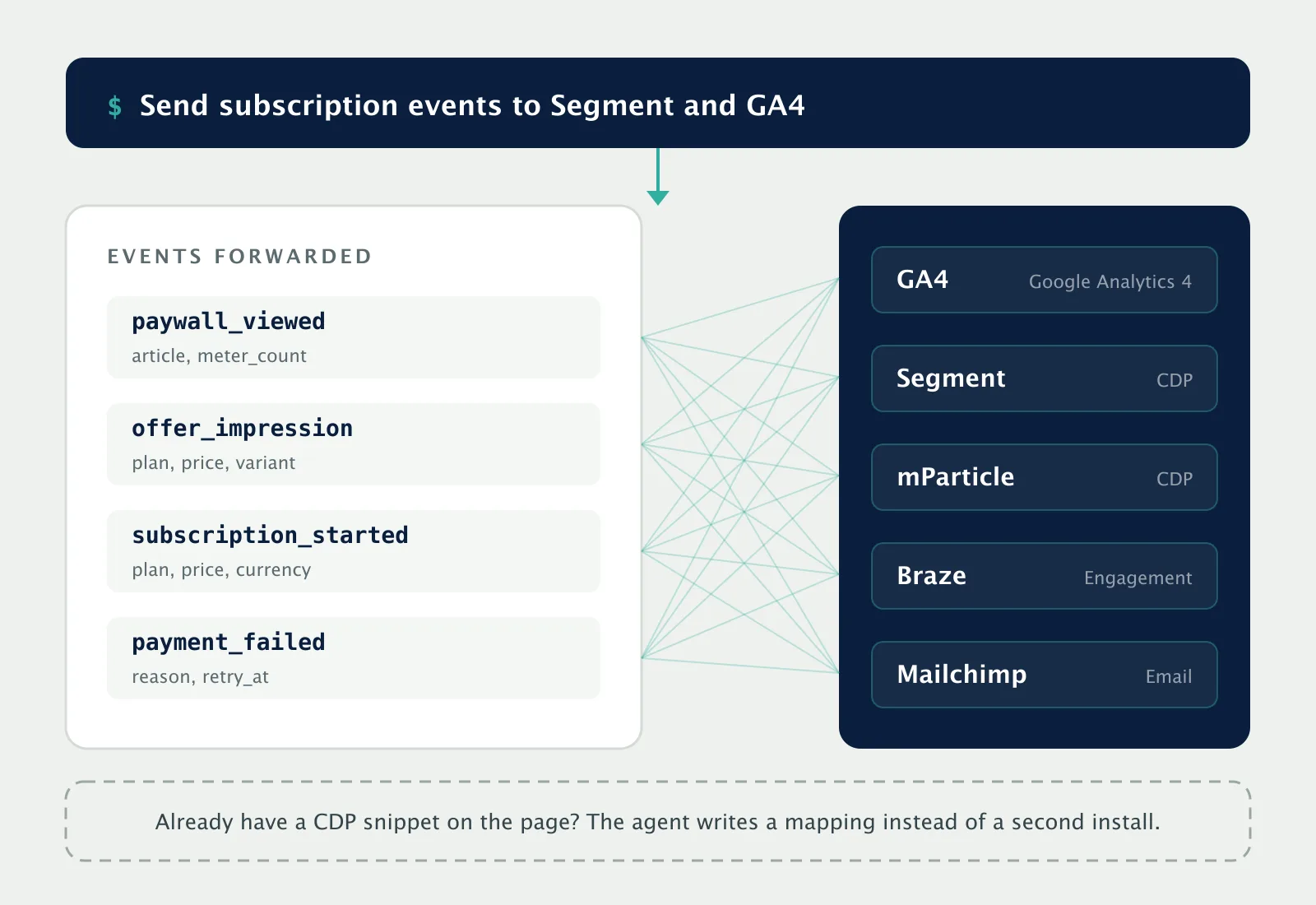
Analytics wiring is a prompt as well. Ask it to "send subscription events to Segment and GA4," and the agent maps events like paywall_viewed and subscription_started to the names your dashboards already expect. It also works with mParticle, Braze, and Mailchimp. If a CDP snippet is already on the page, it writes a mapping instead of a second install.
AI coding agent vs. AI Harness
Pelcro's coding agent changes your site's code. If the change you need is in your data instead, such as updating thousands of subscriptions or finding inactive customers, that is a job for the AI Harness. Both follow the same rule: the AI does the work, and a person approves it before anything goes live.
Frequently Asked Questions
What is an AI coding agent in simple terms?
An AI coding agent is software that turns a plain-English request into working code. You describe the outcome you want, and the agent finds the right files, makes the change, and gives it back to you to review before it goes live.
What is the difference between an AI coding agent and an AI coding assistant?
An AI coding assistant suggests code while a developer types, one line or block at a time. An AI coding agent takes a whole task, plans it, edits the files it needs, and returns a finished change, so the person asking does not have to write code at all.
Is it safe to let an AI coding agent change my paywall?
It is when every change goes through review. Pelcro's coding agent commits its work to a branch, shows you a preview of your site with the change applied, and only ships after someone approves it. Any change can be reverted in one click.
Do I need an engineer to use an AI coding agent?
Not for everyday paywall, checkout, and analytics changes. Pelcro's coding agent is built so marketing and audience teams can make those changes themselves, and because the output is ordinary code in your repo, your developers can still review or edit anything it writes.