
Pelcro Release 1.89: Modernized, Faster, Better – React Elements Get a Major Upgrade
- merhan5
- Aug 12, 2025
- 1 min read


🟢 Feature: React Elements Upgrade with UI Enhancements
We’ve released a new version of our React elements, bringing significant improvements across the board:
✨ UI Enhancements: Updated styles, improved responsiveness, and more consistent user experience across all components.
⚛️ React 18 Upgrade: Migrated to React 18 to take advantage of performance improvements and concurrent features.
📦 Dependency Updates: Upgraded several underlying packages for better stability, security, and compatibility.
This update lays the foundation for future improvements, while also modernizing the stack and enhancing performance.

🟢 Updated UI URLs in Integrations Page
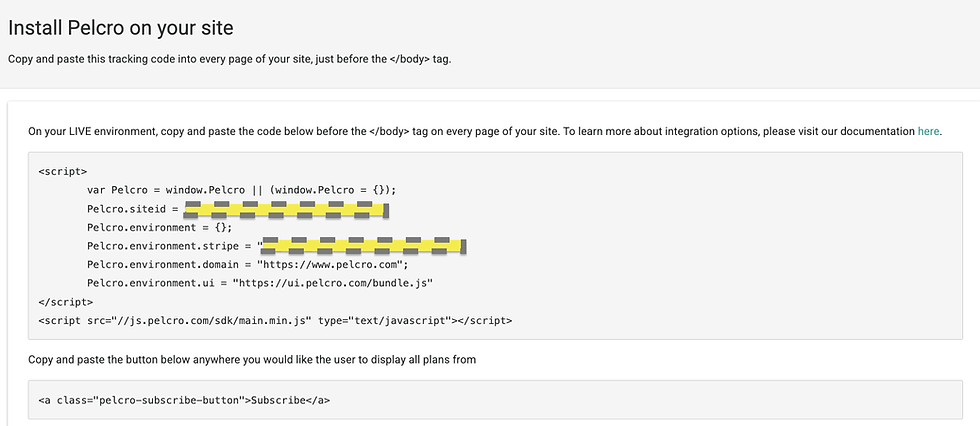
Since we've upgraded our React elements, we've updated the integration script to reflect environment-specific UI bundle URLs.
Staging:
Pelcro.environment.ui = "https://ui.pelcro.com/staging/bundle.js"
Production:
Pelcro.environment.ui = "https://ui.pelcro.com/bundle.js"
This allows projects to load the appropriate version of the UI based on their environment, supporting a cleaner development workflow and ensuring consistency between staging and production.


The combo of UI polish + dependency updates is underrated—most teams feel the stability improvements a few weeks later when support tickets drop. On the environment UI URLs, do you also recommend setting explicit cache headers (or a cache-busting query param) during deploys to avoid clients pulling a half-updated bundle? This “version drift” stuff always makes me think of how style systems evolve over time, like the seasonal palette debates I’ve seen on StyleLookLab where tiny changes end up noticeable in practice. Anyway, curious how you’re handling release cadence for the UI bundle itself.
Upgrading to React 18 plus a styling refresh usually pays off most when you have embedded components living inside lots of different host sites—responsiveness bugs tend to show up in the weirdest edge cases. For the new UI bundle URLs, are you publishing any integrity hashes or versioned filenames so clients can lock to a known-good build? Kind of unrelated, but it reminds me of how “same input, different output” can happen on sites like https://imgg.ai/styles/ghibli depending on what model/version is live that day. Consistency matters a lot once people rely on it.
The environment-specific UI bundle URLs are a practical improvement—especially for teams that do a lot of QA in staging and want parity without manual swaps. Does the upgraded elements package change any CSS classnames or markup that integrators might have been targeting (even though they probably shouldn’t)? Side note, I think I saw a similar “staging vs prod” workflow topic come up on hrefgo when people were discussing demo environments for AI products, and the same pitfalls apply here too.
Nice to see the React elements getting modernized—React 18 + dependency refresh usually ends up fixing a bunch of “death by a thousand cuts” issues in real apps. On the UI bundle URLs: do you pin versions anywhere, or is it always “latest” on those endpoints? I ask because caching/CDN behavior can get weird if teams don’t control rollouts, which is something I’ve run into before when testing tools like classic cipher type detector across environments. Would love to know what your rollback story is if a bundle ships with a regression.
Switching the integration script to environment-specific UI bundle URLs is a solid move—nothing worse than accidentally pulling a staging bundle into prod and chasing weird styling bugs. I wonder if you’ve considered adding a runtime warning when the UI URL doesn’t match the detected environment, kind of a guardrail. Random aside: I was procrastinating on https://blockblast.co the other day and it reminded me how quickly small UX inconsistencies stand out when you’re repeatedly interacting with the same UI.